Thursday, 16 December 2010

Flash a-ah saviour of the universe!

Todays tutorial was on Adobe Flash, something I've been wanting to learn how to use for a while. It's a lot more complicated than Illustrator but allows you to do a lot more!

We started off with the basics; creating frames, key frames and 'scrubbing' through those frames.

Action Script 2.0
The menu and toolbars are quite different to those in illustrator and photoshop. Apparently this is because Flash was created by Macromedia and bought by Adobe.

Symbols
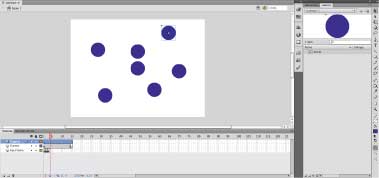
Creating symbols helps to keep the file size down. To do this go to the top menu bar: Modify > Convert to Symbol (F8)

Tween
Next we looked at a process called 'Tweening' which allows you to animate the symbol you have created. There are two main types of tweening; Motion and Classic Tween. Classic Tween allows Flash to create the path for you from the 1st frame to the last. Motion allows you to make your own motion path.

Nesting

Nesting is the process of placing symbols into other symbols, creating groups of symbols.

Movie Clips

Movie Clips are self contained/ independent flash movies that will continue to 'loop'. They are basically symbols with motion.

The standard rate of frames is 24 frames per second, so the 24th frame is 1 second. This is the preferred speed as it tricks the eye into thinking the frames are continues rather than separate images flashing.

Tuesday, 14 December 2010

Marek Reichman - Aston Martin

I recently found out that a Teesside University graduate, who studied Industrial Design, is now Director of Design at Aston Martin. Marek Reichman was recently awarded a 'Doctorate in Professional Achievement' by the University.

Below is the latest car created by Marek's design team. The car is said to be a piece of art in itself but what first caught my eye was the way it was shown to the public, almost like an installation in a gallery.
The way the OLED lamps reveal the car as they light up the room is a very clever way of introducing the car to the audience.

Inspiration

I've been doing a bit of research for my new task, in which we have to incorporate our logo into a poster and web banner.

Pentagram is a british design studio who have a nice section on poster design on their website:

This particular poster, designed by Michael Bierut, was interesting as I thought it related to my 'appearing over time' concept. The way the letters overlap each other make it harder to read but symbolise light traveling to the viewer.

Photoshop Tutorial

Never really used photoshop before, everyone seems to start of using it but I got the CS3 version of illustrator a few years ago and taught myself how to use the adobe software on that.

We've bene looking at the more technical side of Photoshop; file size, saving for web and resolution.
Above are samples of different image resolutions being viewed at 100%. 300dpi - is the preferred choice of resolution in commercial print.
We also played around with different layers and brush strokes in photoshop. I haven't used the stamp tool before but I can see it being useful in the future.
Next was how to save your files for web and devices. Care has to be taken when deciding on image quality and file type.  

Old Work

Found some old collage work today, I'd scanned a few pieces in a few months ago for my interview.
The work is from one of my A-level projects entitled 'Paradise'. I ended up with this idea of Adam & Eve in the Garden of Eden.
This was a copy of one of Albert Durer's etchings 'The Expulsion' which shows Adam & Eve getting sent out of the Garden.